Skip to content
Mixany

Qwen Image 3.0

Qwen Image 3.0 AI Image Model

Qwen Image 3.0 is an image model for long prompts, readable text, multilingual layouts, diagrams, interface concepts, and targeted image edits. See examples and prompt tips here; use Nano Banana Pro in Mixany while Qwen Image 3.0 is not yet available.

Nano Banana Pro is available in Mixany

Qwen Image 3.0 is not available in Mixany yet. Nano Banana Pro is the current alternative for image generation and edits.

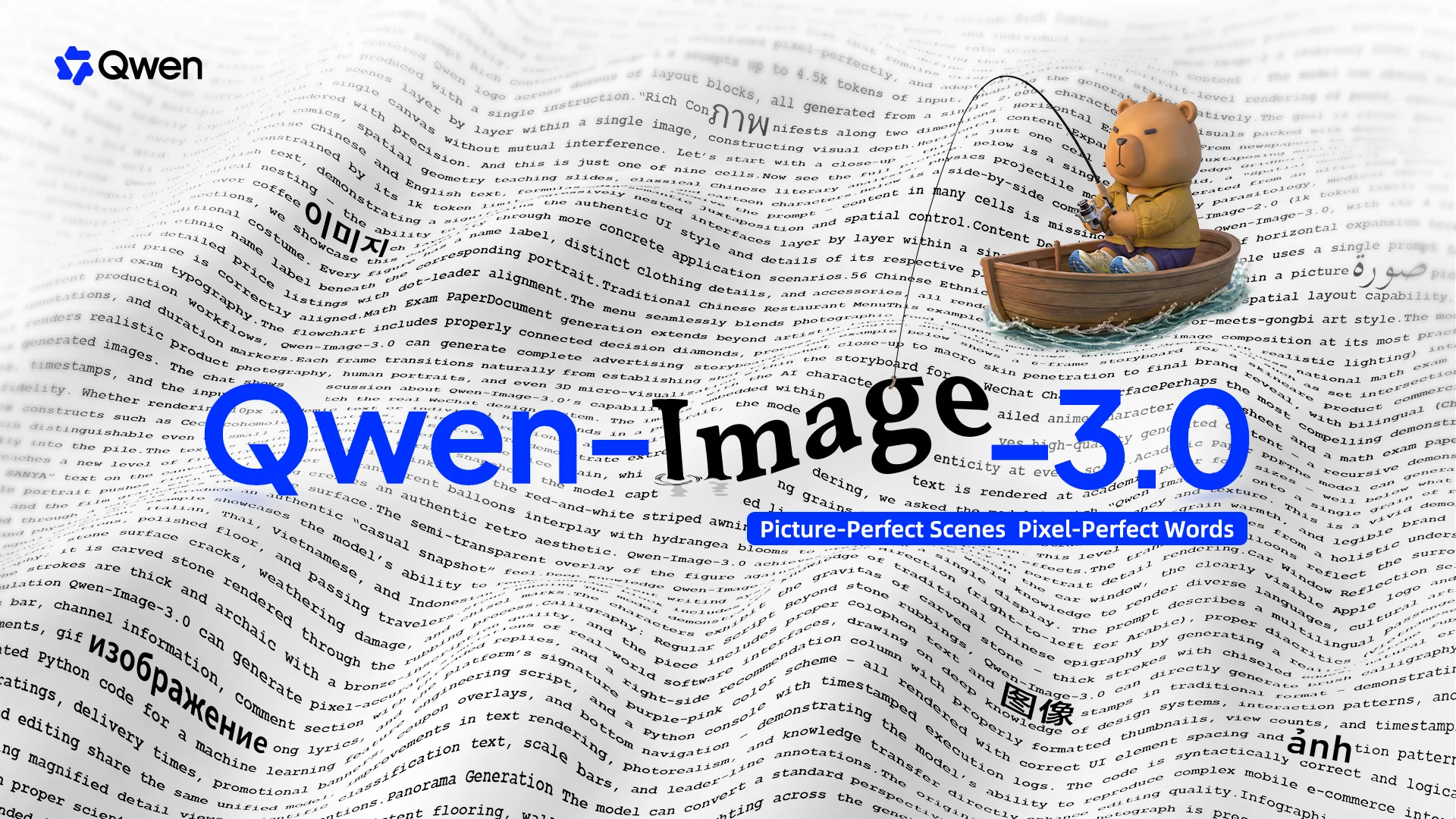
Official Qwen Image 3.0 release showcase with dense visual layouts
Dense visual layouts demonstrating multilingual typography, structured information, and targeted editing.

Source · Read the official Qwen Image 3.0 release

Qwen Image 3.0 prompt and image examples

Use these Qwen Image 3.0 prompt examples to study infographics, posters, editorial layouts, and the text hierarchy a detailed image brief needs.

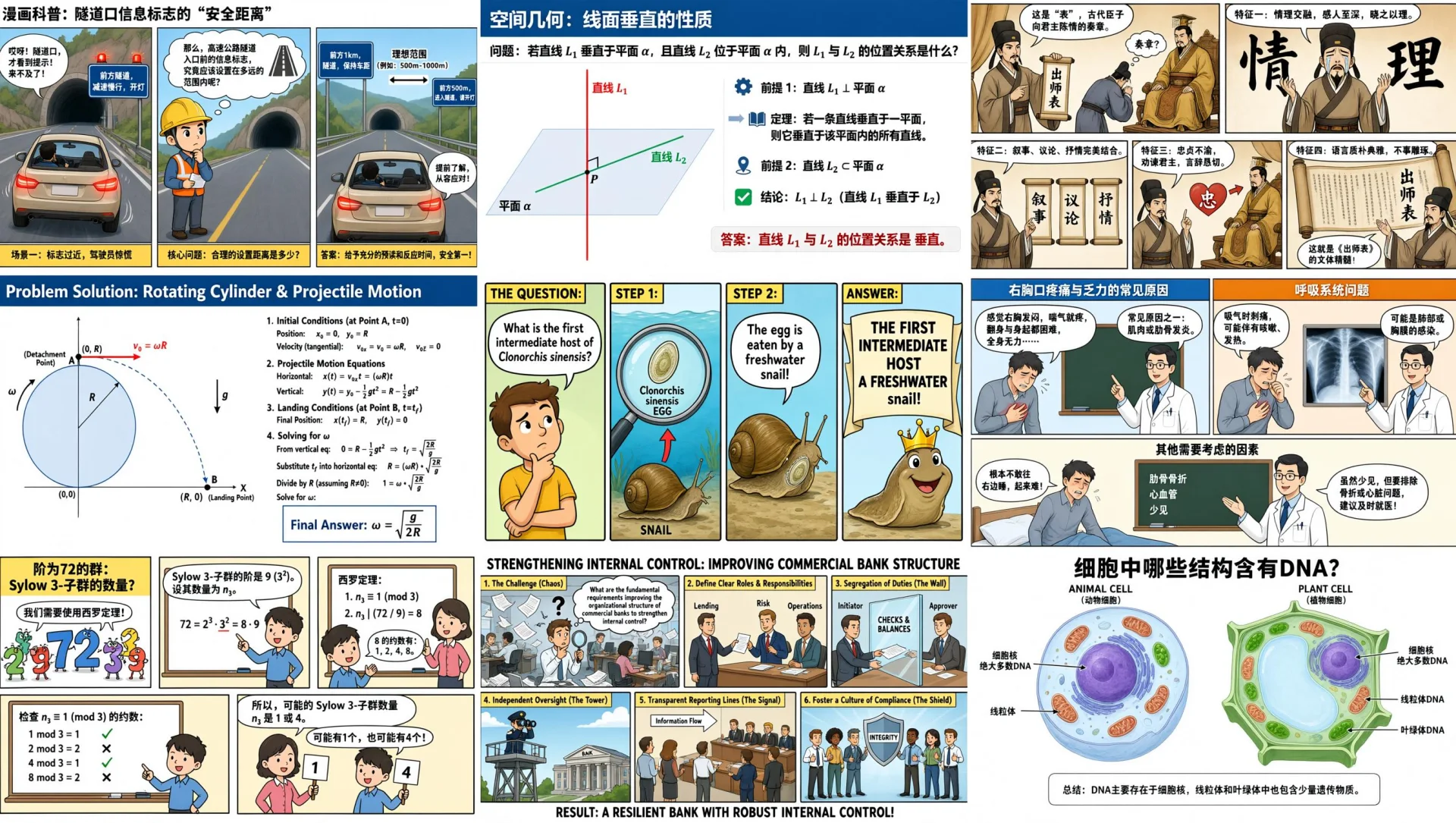
Official Qwen Image 3 knowledge grid with nine educational modules

Long-instruction layout

Nine complete lessons still read as one system

The official 3×3 knowledge board tests long instructions, distinct modules, consistent visual language, and a complete reading order in one image.

Qwen Image 3.0Long instructionsNine modulesStructured hierarchy

Source · Qwen Qwen Image 3.0 official release and capability examples

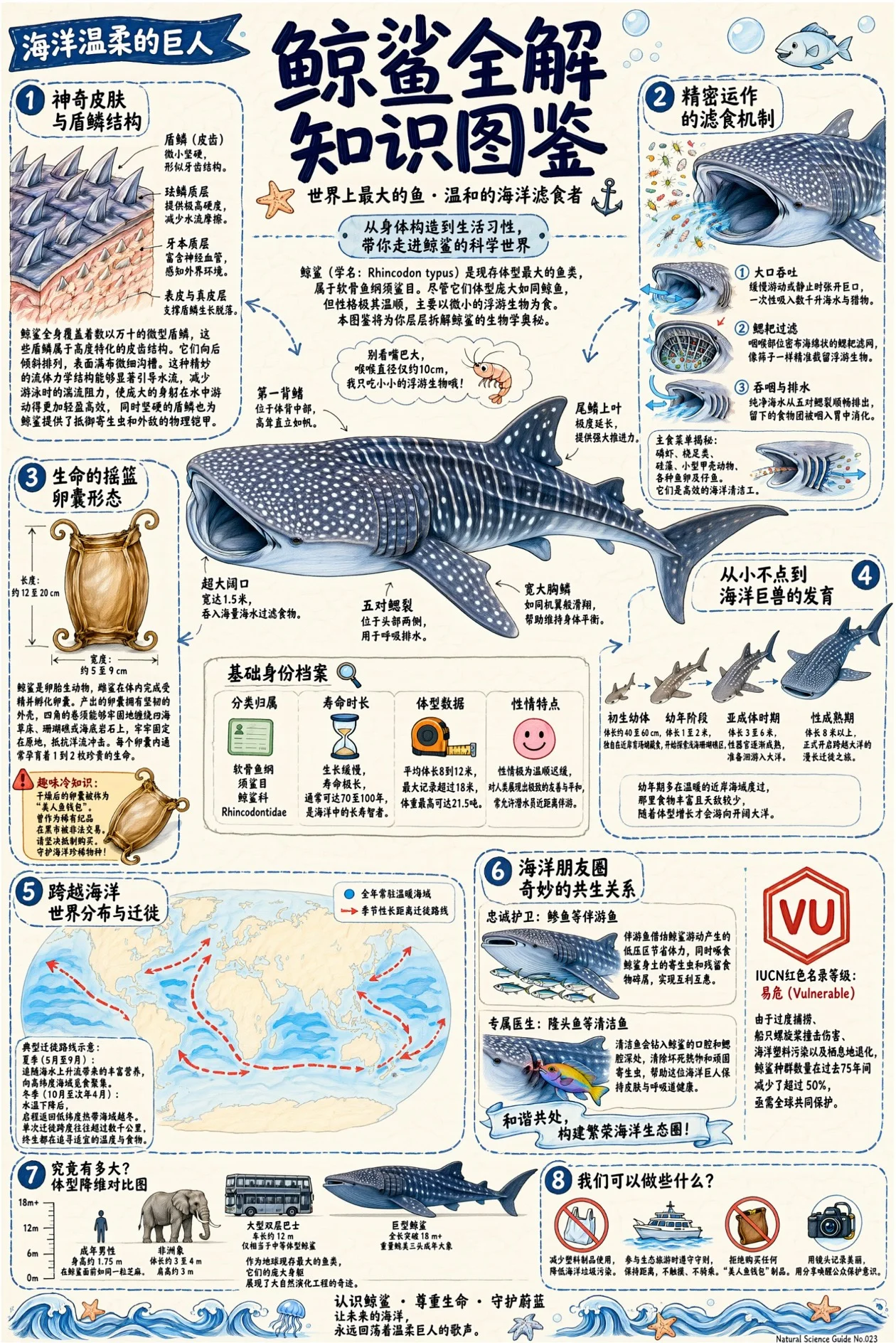
Official Qwen Image 3 whale infographic with fine labels and callouts

Information design

An infographic has to explain, not merely decorate

Illustration, detailed labels, callouts, and a complete editorial sequence share one tall information-dense frame.

Qwen Image 3.0Fine labelsEditorial hierarchyTall composition

Source · Qwen Qwen Image 3.0 official release and capability examples

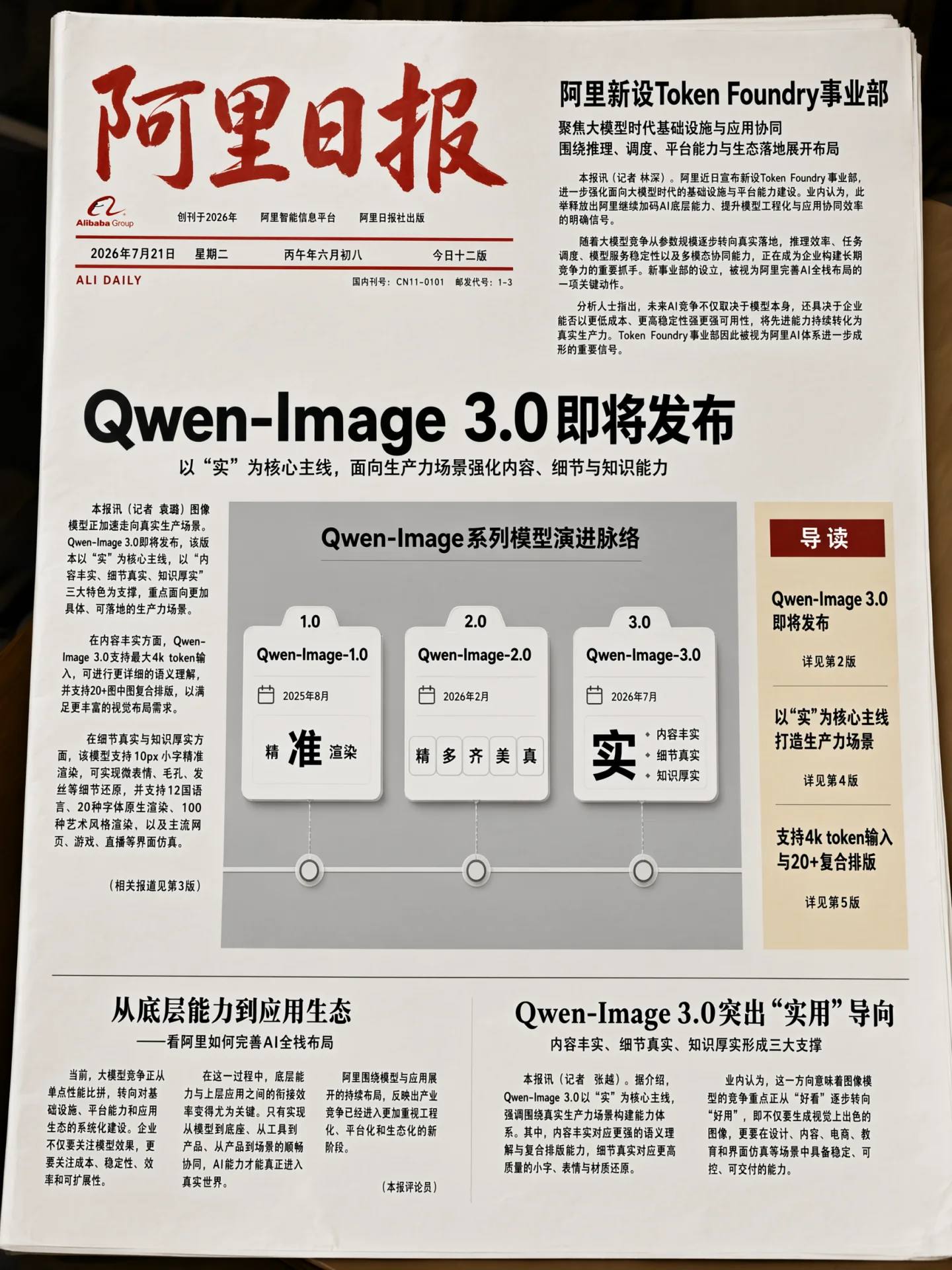
Official Qwen Image 3 newspaper layout with dense readable typography

Dense typography

Columns and captions behave like a publication

The newspaper example coordinates headlines, body columns, photographs, captions, and whitespace as a readable artifact.

Qwen Image 3.0Multi-column layoutSmall typePublication hierarchy

Source · Qwen Qwen Image 3.0 official release and capability examples

Is Qwen Image 3.0 right for your creative job?

Scan the current Mixany facts, best-fit tasks, and limits before you choose a model in Create.

Instruction capacity

Up to 4.5K tokens

Text rendering

About 10 px in official examples

Visual language range

12 rendered languages, multiple fonts

Style range

100+ documented styles

Official references

1–3 images + Chinese or English instructions

Official output examples

1–6 PNG files, 512–2048 dimensions

Best for

Multilingual posters that hold their hierarchy

Use long, structured briefs for headlines, captions, labels, and supporting copy across the 12 rendered languages highlighted in the official release.

Dense infographics and instructional visuals

Build newspapers, storyboards, exam papers, interfaces, knowledge diagrams, and other compositions where text and spatial relationships carry the value.

Targeted edits from one to three references

The official image workflow supports generation and editing, so each reference can be assigned a clear role while untouched regions are explicitly preserved.

Limits to plan around

  • Reference images should have distinct roles. Describe which image controls identity, product, style, or composition instead of asking the model to infer it.
  • Official documentation describes image dimensions from 512 through 2048 pixels, one to six PNG outputs, and one to three reference images. A product interface can expose a different subset.
  • Use a fixed seed when iterating on the same prompt and reference set to improve repeatability.
  • Qwen Image 3.0 uses application access and is not yet connected to Mixany. Nano Banana Pro is available in the current creator.
  • The official release describes a broad visual and typography range. Do not assume that earlier open Qwen-Image releases represent this product’s access or controls.

Qwen Image 3.0 generation and editing

Qwen Image 3.0 is designed for detailed image prompts with readable text, structured layouts, references, and targeted edits.

Reference only · Long-instruction layout

Nine complete lessons still read as one system

The official 3×3 knowledge board tests long instructions, distinct modules, consistent visual language, and a complete reading order in one image.

Qwen Image 3.0Long instructionsNine modulesStructured hierarchy

Reference source · Qwen Qwen Image 3.0 official release and capability examples

Detailed prompts with multiple sections

Long, structured prompts can coordinate each module, its content, the grid, reading order, colors, typography, and relationships in one image. Educational boards, story plans, presentation graphics, and other images with several distinct sections benefit from that structure.
Reference only · Information design

An infographic has to explain, not merely decorate

Illustration, detailed labels, callouts, and a complete editorial sequence share one tall information-dense frame.

Qwen Image 3.0Fine labelsEditorial hierarchyTall composition

Reference source · Qwen Qwen Image 3.0 official release and capability examples

Small text with a real information hierarchy

Combine a dominant illustration with fine labels, numbered callouts, supporting diagrams, and editorial copy without treating text as surface texture. The practical benefit is not simply sharper lettering: it is a visual that can guide the reader from headline to explanation and stay understandable when used in a poster, report, lesson, or phone-sized asset.

Reference only · Dense typography

Columns and captions behave like a publication

The newspaper example coordinates headlines, body columns, photographs, captions, and whitespace as a readable artifact.

Qwen Image 3.0Multi-column layoutSmall typePublication hierarchy

Reference source · Qwen Qwen Image 3.0 official release and capability examples

Dense publication layouts that still breathe

Coordinate headlines, body columns, captions, photographs, rules, and whitespace as parts of the same publication grid. This makes Qwen Image 3.0 relevant to newspapers, editorial concepts, menus, brochures, and multilingual campaign layouts where each text level needs a clear role and the page cannot collapse into a collage of unrelated blocks.

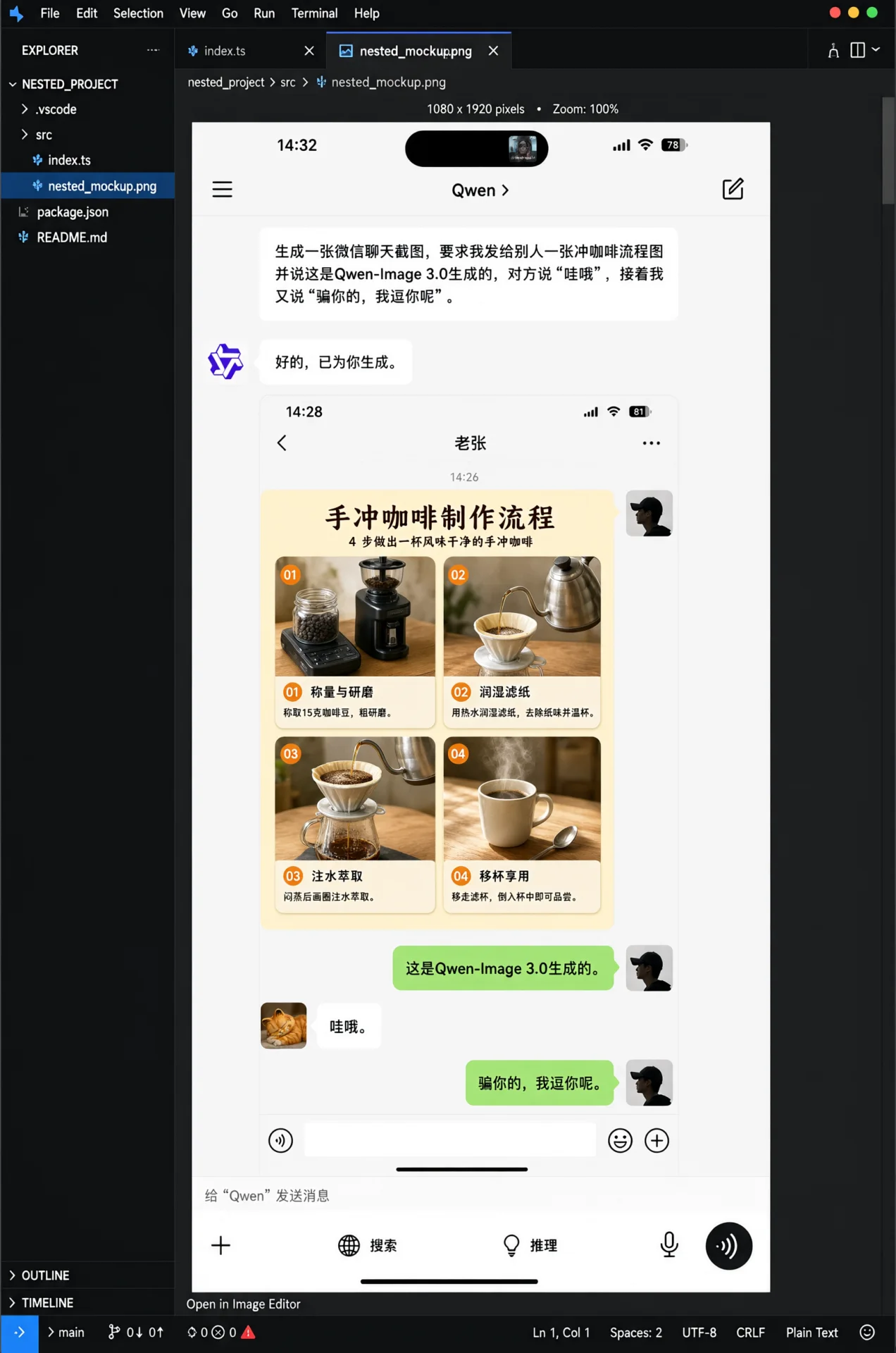
Official Qwen Image 3 nested application interface example

Interface composition

A complete interface can exist inside the image

Repeated panels, navigation, controls, labels, depth, and product-design language remain coherent across a complex nested application screen.

Qwen Image 3.0Nested UIRepeated controlsProduct system

Source · Qwen Qwen Image 3.0 official release and capability examples

Interfaces with consistent product language

Build navigation, working canvases, inspectors, repeated controls, labels, and visual states within one image while keeping spacing and component language consistent. It gives product teams a stronger starting point for interface concepts and launch visuals because the screen can communicate an actual hierarchy instead of only suggesting a futuristic dashboard atmosphere.

Official Qwen Image 3 textbook result after a targeted text edit

Input references

Official Qwen Image 3 textbook source before a targeted text edit

Input 1

Targeted editing

One mark changes without rebuilding the page

The textbook pair makes the edit boundary visible: selected text changes while diagrams, paper, spacing, crop, and surrounding copy remain stable.

Qwen Image 3.0Local text editProtected regionsLayout preservation

Source · Qwen Qwen Image 3.0 official release and capability examples

Local edits that respect protected regions

Name the exact replacement, then explicitly preserve all surrounding text, illustrations, spacing, texture, light, and crop that should not move. This edit contract matters for production assets because correcting one headline, label, color, or product detail is only useful when the rest of an already-approved composition survives the change intact.

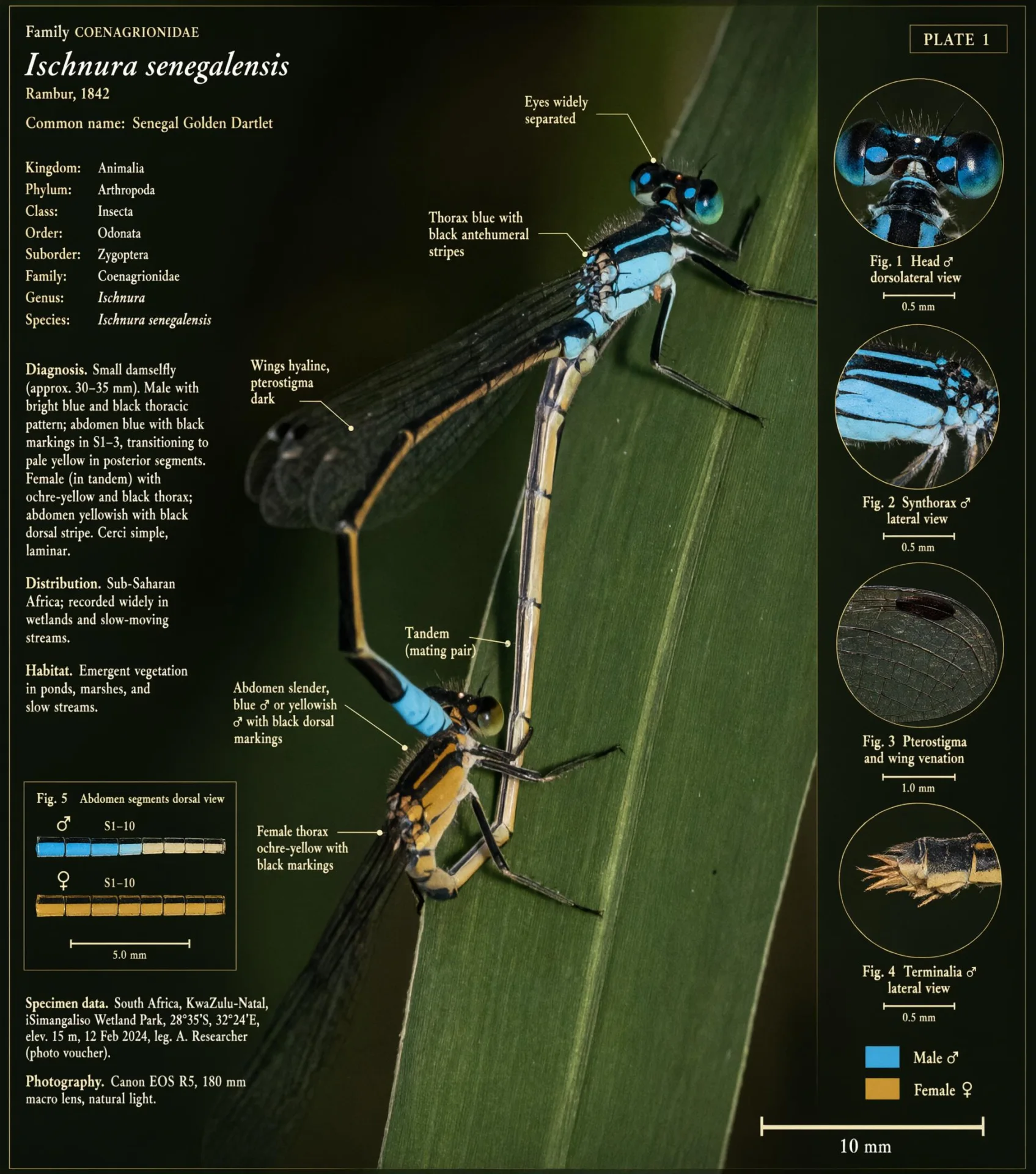
Official Qwen Image 3 labeled insect research plate result

Input references

Official insect reference supplied to Qwen Image 3

Input 1

Reference transformation

A source photograph becomes a research plate

The result keeps the insect recognizable while adding labels, supporting views, material details, and scientific notes.

Qwen Image 3.0Reference identityExplanatory labelsScientific layout

Source · Qwen Qwen Image 3.0 official release and capability examples

References expanded into explanatory artifacts

Use a source image to anchor subject identity and recognizable structure, then add supporting views, labels, material studies, and an appropriate visual language around it. This supports research plates, product breakdowns, educational diagrams, and catalog concepts where the reference must remain identifiable even as the result becomes much more informative than the original photograph.

Qwen Image 3.0 FAQ

Learn about Qwen Image 3.0 image generation, editing, prompt examples, output sizes, references, and availability.

Qwen Image 3.0 is Qwen’s released image generation and editing model for complex briefs, small text, multilingual layouts, dense visual information, and targeted edits. Official materials describe text prompts alone or with one to three reference images.

Related AI image tools

Generate a new image, edit an existing image, or remove an image background in Mixany.

01

Nano Banana Pro

Use it now for premium image generation, precise text, and subject consistency across references.

02

Seedream 5.0 Pro

Use it for high-fidelity generation and editing with strong reference-image handling.

03

AI Image Generator

Compare AI image models and generate a new image from a text prompt.

Generate an AI image from a detailed prompt.

Describe the image, text, layout, and reference details in Mixany. Use an available image model now, then reuse the same prompt when Qwen Image 3.0 arrives.

  • Generation + targeted editing
  • Long structured briefs
  • Nano Banana Pro available in Mixany
Explore image editing